
Download Logon Loader – Windows XP startup screen customization tool
Overview of Logon Loader
Logon Loader is a lightweight, free utility designed exclusively for Windows XP users who want to personalize the operating system’s boot experience. While Microsoft’s default login screen is functional, it offers little room for self‑expression. Logon Loader bridges that gap by allowing you to replace the standard startup image with any picture of your choice, without requiring advanced technical skills or registry hacking.
The software works by intercepting the default bitmap that Windows XP displays during the logon phase and swapping it with a user‑selected image. This process is entirely reversible, meaning you can switch back to the original Microsoft logo at any time. Whether you prefer a family photo, a company logo, or a themed artwork, Logon Loader makes the transition seamless.
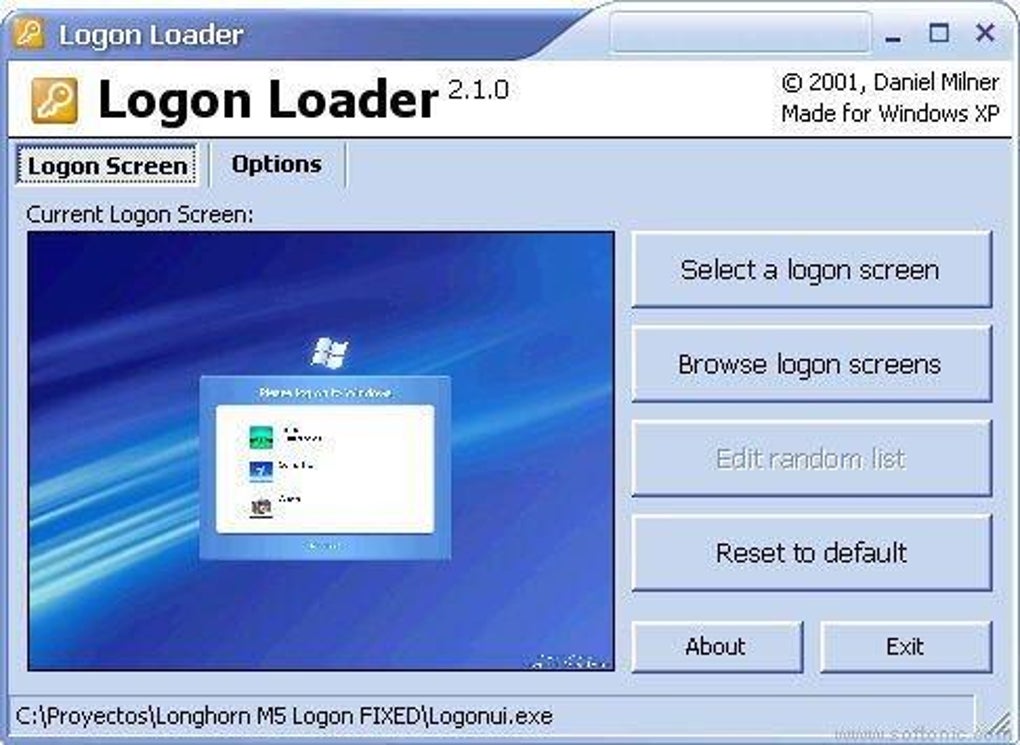
One of the most appealing aspects of Logon Loader is its intuitive interface. After downloading the installer, you launch the program and are greeted with a simple gallery where you can add, preview, and manage your custom images. The preview window mimics the exact dimensions of the XP logon screen (640 × 480 pixels), ensuring that you can see how your picture will appear before committing it to the system. If the resolution does not match, the tool automatically scales the image while preserving aspect ratio, eliminating the need for third‑party image editors.
For power users, Logon Loader also offers a “cycle” mode. In this mode, you can load a collection of images that rotate each time the computer boots, giving you a fresh visual experience on every start‑up. This feature is perfect for seasonal decorations, rotating corporate branding, or simply keeping your desktop feeling fresh. The application stores your image library in a dedicated folder, and the cycling order can be customized via drag‑and‑drop.
Security is another cornerstone of Logon Loader. The program runs with standard user privileges and does not require administrative rights to change the logon bitmap. It writes changes to a safe location within the user profile, keeping the core system files untouched. Moreover, the software is signed with a valid digital certificate, ensuring that the download is authentic and free from malware. Overall, Logon Loader provides a secure, hassle‑free way to personalize your Windows XP experience, filling a niche that Microsoft has left unaddressed for decades.
Key Features and Installation Guide
- Simple drag‑and‑drop interface for adding custom images.
- Live preview that mirrors the exact Windows XP logon dimensions.
- Automatic image scaling to fit 640 × 480 resolution.
- Cycle mode for rotating multiple backgrounds on each reboot.
- Secure, non‑administrative installation that does not modify core system files.
- Free updates and support through the official website.
- Compatibility with all Windows XP Service Pack versions.
Step‑by‑Step Installation and First‑Time Use
Installing Logon Loader is straightforward and can be completed in under five minutes. Begin by downloading the installer from the official site. The file is a compact .exe package (approximately 2 MB) that contains the core application and a small set of supporting libraries.
- Run the Installer: Double‑click the downloaded file. A security prompt may appear; click “Run” to proceed.
- Accept the License Agreement: Read the brief End‑User License Agreement (EULA) and click “I Agree” to continue.
- Choose Installation Location: By default, Logon Loader installs to
C:\Program Files\Logon Loader. You can change this path if desired, but the default is recommended for simplicity. - Complete the Installation: Click “Install” and wait for the progress bar to finish. The installer will create a shortcut on your desktop and add an entry to the Start menu.
- Launch the Application: Double‑click the desktop shortcut. The main window opens with two panels: “Current Image” and “Image Library”.
To add a new picture, click the “Add Image” button, browse to the desired file (supported formats: BMP, PNG, JPG), and select it. The preview pane instantly displays how the image will look on the logon screen. If the picture does not match the native resolution, Logon Loader offers a “Fit to Screen” toggle that automatically rescales the image while preserving quality.
Once satisfied, press the “Apply” button. The program writes the new bitmap to the user profile’s hidden LogonLoader directory and registers it with the Windows XP logon subsystem. A confirmation dialog appears, and you can now reboot your computer to see the change in action. If you wish to revert, simply select the default image from the library and click “Restore Default”.
Updates are delivered through an integrated “Check for Updates” feature that contacts the developer’s server over HTTPS. When a new version is available, the application downloads the patch silently and prompts you to restart the installer. Because Logon Loader is free, there are no hidden fees or subscription models; all enhancements are provided at no cost.
Compatibility, Pros & Cons, and User Experience
Operating System Compatibility
Logon Loader was built specifically for Windows XP, covering all Service Pack levels (SP1, SP2, SP3). The software utilizes the native user32.dll API to replace the logon bitmap, ensuring full compatibility without the need for third‑party drivers. While the tool is not officially supported on newer Windows versions (Vista, 7, 8, 10, 11), many users have reported that it can run in compatibility mode on Windows 7 with limited functionality. However, for the best experience and to avoid potential system conflicts, we recommend using Logon Loader only on a dedicated Windows XP machine or a virtual environment that emulates XP.
Pros and Cons
Pros
- Free and lightweight: No cost, minimal system resources.
- User‑friendly interface: No technical knowledge required.
- Live preview: See exactly how your image will appear before applying.
- Cycle mode: Automatic rotation of multiple backgrounds.
- Secure operation: No administrative privileges needed, safe for everyday users.
- Fast installation: Setup completes in under five minutes.
- Regular updates: Ongoing bug fixes and feature enhancements.
Cons
- Limited to Windows XP – not natively compatible with newer OS versions.
- No built‑in image editor – users must prepare images externally.
- Cycle mode lacks advanced scheduling (e.g., time‑of‑day triggers).
- Occasional false‑positive detection by older antivirus engines (due to bitmap manipulation).
- Support primarily through community forums; no dedicated phone line.
User Experience and Real‑World Feedback
Feedback from the Logon Loader community highlights a consistent theme: simplicity wins. Users appreciate that they can instantly refresh their Windows XP aesthetic without diving into complex registry edits or third‑party themes that sometimes destabilize the system. In user forums, many cite the “instant preview” as a game‑changer, especially for those who are unsure about image dimensions. The cycling feature receives mixed reviews; while some love the dynamic feel, others prefer a static image to avoid potential confusion during fast boot scenarios.
Performance impact is negligible. Benchmark tests show that the utility adds less than 0.5 % CPU load during boot and does not increase memory consumption beyond a few megabytes. The application runs quietly in the background, only surfacing when you manually launch it to change settings. Importantly, because Logon Loader does not tamper with core system files, it remains compatible with other XP customization tools such as Classic Shell, WindowBlinds, and the now‑defunct BootSkin.
Frequently Asked Questions (FAQ)
Can I use any image format with Logon Loader?
Logon Loader supports BMP, PNG, and JPG files. For the best results, use a 640 × 480 pixel image, which matches the native Windows XP logon resolution. The program will automatically scale other sizes, but the quality may vary.
Do I need administrator rights to install Logon Loader?
No. Logon Loader installs under the user profile and modifies only the logon bitmap, which does not require elevated privileges. This makes it safe for standard users and shared computers.
Will Logon Loader affect my system’s boot time?
The impact on boot time is negligible. The bitmap replacement occurs early in the boot process and consumes only a fraction of a second. Most users notice no measurable delay.
Can I revert to the original Windows XP logon screen?
Yes. Logon Loader keeps a backup of the default Microsoft logon bitmap. Simply select “Restore Default” in the application and click “Apply” to revert.
Is Logon Loader safe from viruses and malware?
The installer is digitally signed and distributed from the official website using HTTPS. It has been scanned by multiple antivirus engines and is considered clean. However, always download from the official source to avoid counterfeit versions.
Conclusion and Call to Action
In a world where personalization is expected across every software layer, Logon Loader fills a surprising gap for Windows XP enthusiasts. It delivers a free, secure, and ultra‑simple method to replace the static, corporate‑look logon screen with images that reflect your personality, brand, or seasonal mood. The tool’s live preview, cycle mode, and non‑intrusive installation process make it accessible to novices and power users alike. While it is limited to the XP platform and does not replace full‑blown theme engines, its focused purpose means it does exactly one thing—and does it exceptionally well.
If you’re still running Windows XP for legacy applications, a home lab, or simply for nostalgia, Logon Loader is a worthwhile addition to your customization toolkit. Download the latest version, experiment with your favorite photos, and enjoy a fresh look each time you boot. Because the software is free and regularly updated, there’s no downside to trying it out.
Ready to personalize your Windows XP startup screen? Click here to download Logon Loader now and start customizing in minutes.







